
How to Access VM from Browser
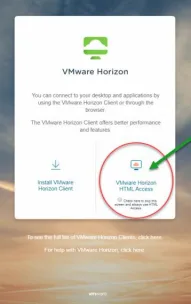
To Login from Home: Open a browser and visit https://viewportal.lakelandcollege.edu
Select VMware Horizon View HTML Access on the right side.
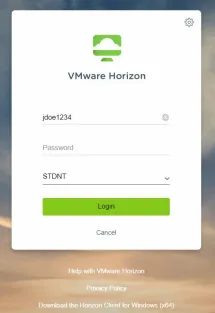
Computer Login information for Campus and Home:
Enter your username (this is the first part of your email address before the @ symbol)
Ex: JDoe1234@lakelandcollege.edu
You default password will be provided to you in your welcome letter.
**Please use your personal U:\ for classwork if you are a student or staff using a student VM**
You can access it on campus and at home.
**Note – All files left in the student’s U:\ will be deleted at the end of each semester. This does not pertain to staff U:\ drives**