
Dropping/Withdrawing From Courses in Navigate
Note: Removing yourself from a course before the refund deadline is considered a “DROP” at Lake Land College. Students may drop a course through the first 10 days of the semester for a 16-week course and through the first 5 days for an 8-week course. Contact Admissions at 217-234-5434 or admissions@lakelandcollege.edu for drop dates for courses that are shorter than 8 weeks. After the refund deadline, removing yourself from a course is considered a “WITHDRAWAL”; students who withdraw are not eligible for a refund. In Navigate, both a DROP and a WITHDRAWAL occur within the Drop Course command, as explained below.
Log in to Navigate
Go to https://lakelandcollege.navigate.eab.com/ and log in to Navigate using your Laker Hub or Canvas credentials. You can also log in by clicking on the Navigate link in the Laker Hub. Contact navigatehelp@lakelandcollege.edu if you have difficulty logging in to Navigate.
Accessing the Scheduler
From your Navigate site, access the Scheduler by clicking on Schedule Courses in the menu at the top of the site.

Dropping a Course/Withdrawing from a Course
If you have registered for a course, you may drop it before the refund deadline, or withdraw after the refund deadline and before the deadline to withdraw in the Scheduler. To do this, click on the course in the My Schedule timeline at the top right of the Scheduler. The course information box will appear. Click the hamburger menu next to Actions to bring up the Drop Course option. Click on Drop Course to drop or withdraw from the course.
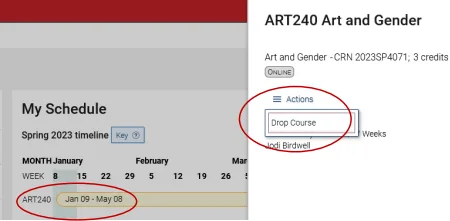
You will be prompted to confirm you wish to drop/withdraw from the course. Upon confirming, you will receive a transaction summary of the action.